 SnipSheet
Turn any table on your screen into Excel
PDFs, scans, images and web pages. Drag a box around the table and get a clean spreadsheet with real numbers, not text.
Add to Chrome, it's freeFree Chrome extension · 20 tables a month free · Works on Mac and Windows
How it works
Three steps, about ten seconds.
Click SnipSheet
On any page or PDF, click the SnipSheet icon or press Alt+Shift+S. Or open a PDF straight in SnipSheet.
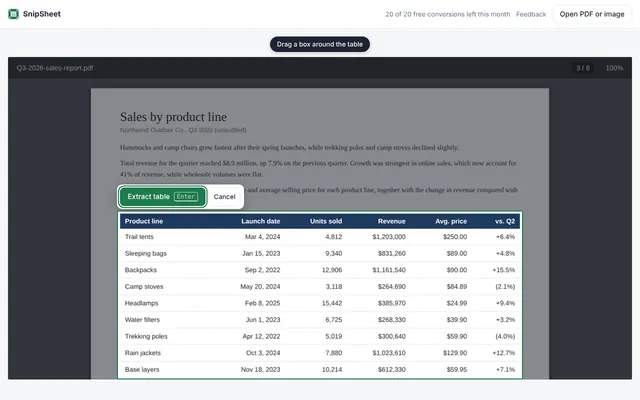
Drag a box
Select the table you need. SnipSheet reads it row by row and recognises the numbers and dates.
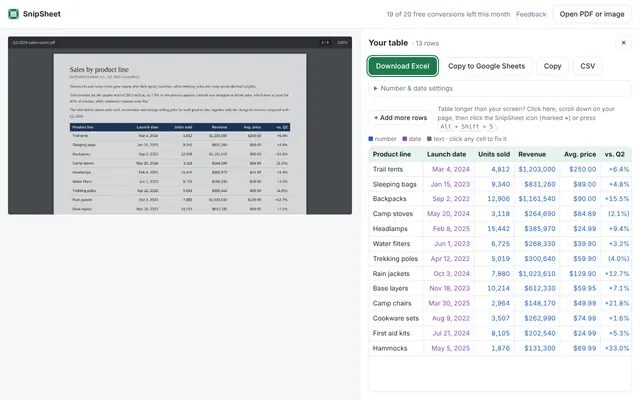
Export
Download Excel, copy to Google Sheets, copy, or save as CSV.
Why SnipSheet
Built for the tables that copy and paste can't handle.
Real numbers, not text
Sum, sort and chart right away. Currencies, percentages and dates are recognised.
PDFs, scans and screenshots
Open a PDF straight in SnipSheet, select a table on any web page, or paste a screenshot.
International formats
1,234.56 and 1.234,56, kr., €, $, £ and negative amounts in parentheses.
Check before you export
Hard-to-read cells are highlighted, and you can fix any cell with a click.
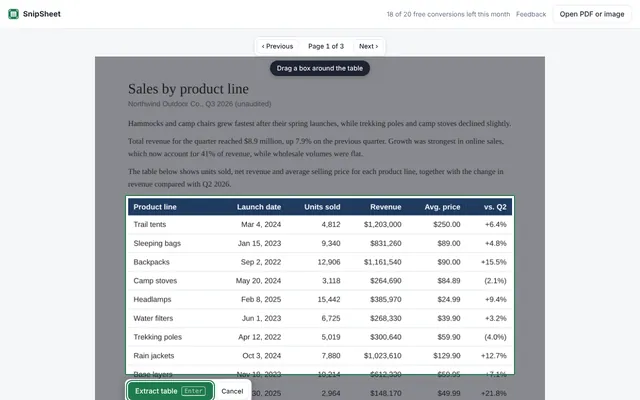
Long tables
Click Add more rows to continue on the next screen or PDF page. Repeated headers are skipped.
Private
Nothing is captured until you click. PDFs open on your computer, and images are never stored.
Great for
Bank and credit card statements · financial reports and invoices · research papers and government reports · dashboards and web pages
Guides
Step by step answers to common table problems.
Questions
Is SnipSheet free?
Yes. The free plan includes 20 tables a month, with no account or sign up.
Does it work on a Mac?
Yes. SnipSheet runs in Chrome on Mac and Windows. It is especially handy on a Mac, where Excel can't import PDFs.
Which browsers does it work in?
Chrome, and Chrome-based browsers such as Microsoft Edge and Brave, which can install it from the Chrome Web Store.
What happens to my data?
Only the area you select is sent to an AI service to read the table, and it isn't stored. PDFs you open in SnipSheet are read on your own computer.
Does it work with scanned PDFs?
Yes. SnipSheet reads tables from scans, photos and screenshots, not only from digital PDFs.
Can I send the table to Google Sheets?
Yes. Click Copy to Google Sheets, and paste with Ctrl+V in the new sheet that opens. Numbers and dates arrive as real values.
Stop retyping tables
Install SnipSheet and try it on the sample table in under a minute.
Add to Chrome, it's free