 SnipSheet
How to convert a bank statement PDF to Excel
For budgeting, taxes or bookkeeping you often need your transactions in a spreadsheet, but the bank only gives you a PDF. Here are your options, starting with the easiest.
First check if your online bank can export CSV or Excel directly. If it only offers PDFs, use SnipSheet: drag a box around the transactions and download them as Excel with real dates and amounts.
Step 0: Ask your bank for a CSV
Many banks let you download transactions as CSV or Excel in online banking, often under "Export" or "Download transactions". If yours does, that is the most accurate source. PDFs are mostly needed for older statements, credit cards, or accounts that only send PDFs.
Turn the PDF statement into Excel with SnipSheet
- Click the SnipSheet icon, then Open PDF or image, and choose the statement.
- Drag a box around the transactions, including the header row (Date, Description, Amount...).
- Click Extract table. Dates and amounts are recognised as real values.
- For statements with several pages, click Add more rows, go to the next page and select the next part. Rows that were already captured are skipped.
- Click Download Excel, or Copy to Google Sheets.
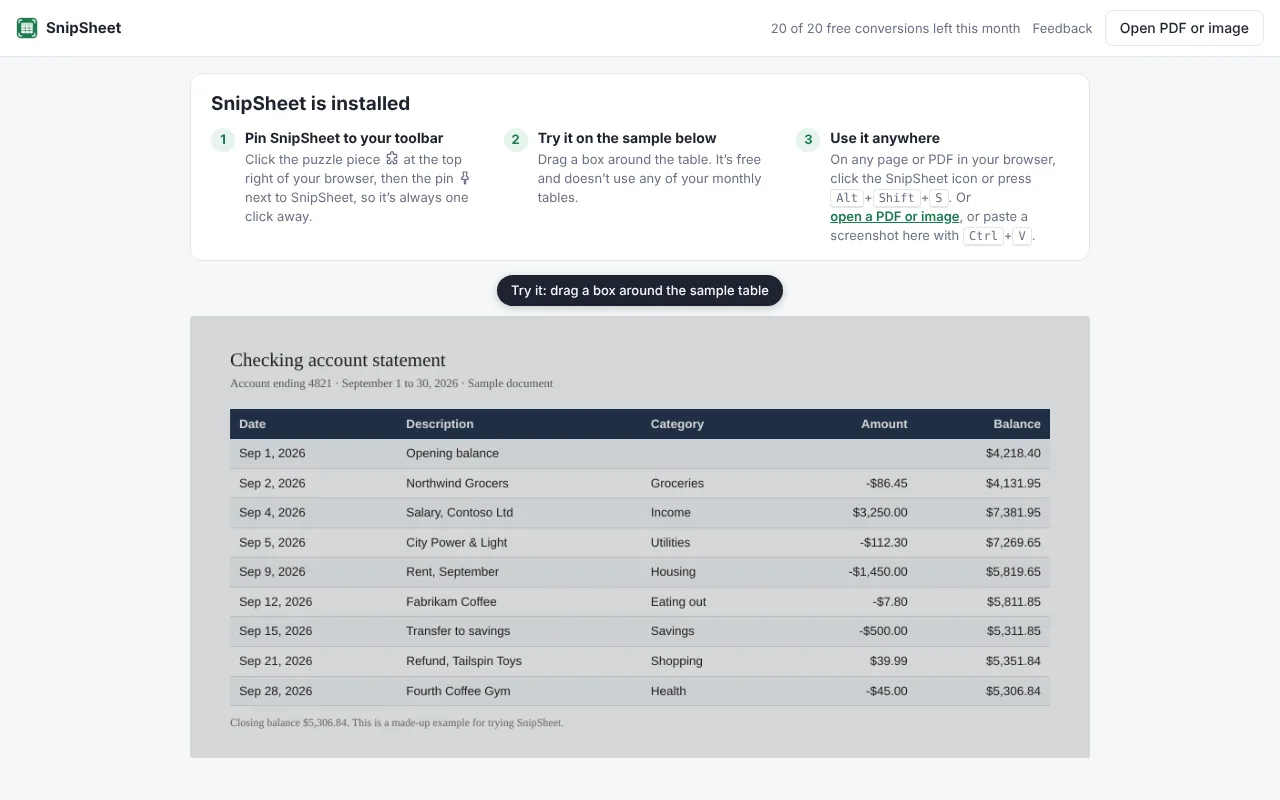
Check before you rely on it
- Compare totals: sum the amount column and compare it with the statement's totals or the change in balance.
- Negative amounts: statements write them as -45.00, (45.00) or with a separate debit column. SnipSheet turns these into negative numbers, but check one or two.
- Dates: if your dates are day/month (like most of Europe), check that 03/04 became April 3rd. You can set the date order in Number & date settings.
Privacy
When you open a PDF in SnipSheet, it is read on your own computer. Only the area you select is sent to read the table, and it isn't stored. Still, remove or skip account numbers you don't need in the spreadsheet.
If you convert many statements a day for clients and need direct imports into accounting software, a dedicated bank statement converter may suit you better. SnipSheet is built for quickly getting any table into a spreadsheet.
Try SnipSheet free. 20 tables a month, no sign up. It comes with a sample table so you can see how it works in seconds.
Add to Chrome, it's freeQuestions
Can I convert a scanned bank statement to Excel?
Yes. SnipSheet reads scanned and photographed statements as well as digital PDFs.
Is it safe to convert bank statements online?
Choose tools that don't store your files. SnipSheet opens PDFs on your computer and only sends the selected area to read the table, without storing it.