 SnipSheet
How to copy a table from a PDF to Excel and keep the columns
You select a table in a PDF, paste it into Excel, and everything lands in one column, or the numbers turn into text. Here is why it happens and two ways to get a clean table.
Excel for Windows can import PDF tables with Data > Get Data > From PDF. For a quicker way that also works on scans, Macs and single tables, use a screenshot to Excel tool like SnipSheet: drag a box around the table and download an Excel file.
Why copy and paste breaks PDF tables
A PDF doesn't store a table as rows and columns. It stores pieces of text at positions on the page. When you copy, you get the text in reading order without the structure, so Excel has no way to know where one column ends and the next begins. Scanned PDFs are worse: they are only pictures, so there is no text to copy at all.
Method 1: Excel's built-in PDF import (Windows)
- In Excel, go to Data > Get Data > From File > From PDF.
- Choose the PDF. Excel lists the tables and pages it found.
- Pick the table and click Load, or Transform Data to clean it up first.
This works well for clean, digital PDFs. It is only in recent Windows versions of Excel (Microsoft 365 and newer), not on Mac, and it can't read scanned PDFs. When a page has an unusual layout, columns often get split or merged.
Method 2: Drag a box around the table with SnipSheet
SnipSheet is a free Chrome extension that reads the table you select, like a person would, and gives you a proper spreadsheet.
- Open the PDF in SnipSheet (click the SnipSheet icon, then Open PDF or image), or open it in Chrome and click the SnipSheet icon.
- Drag a box around the table.
- Click Extract table, check the result, and click Download Excel.
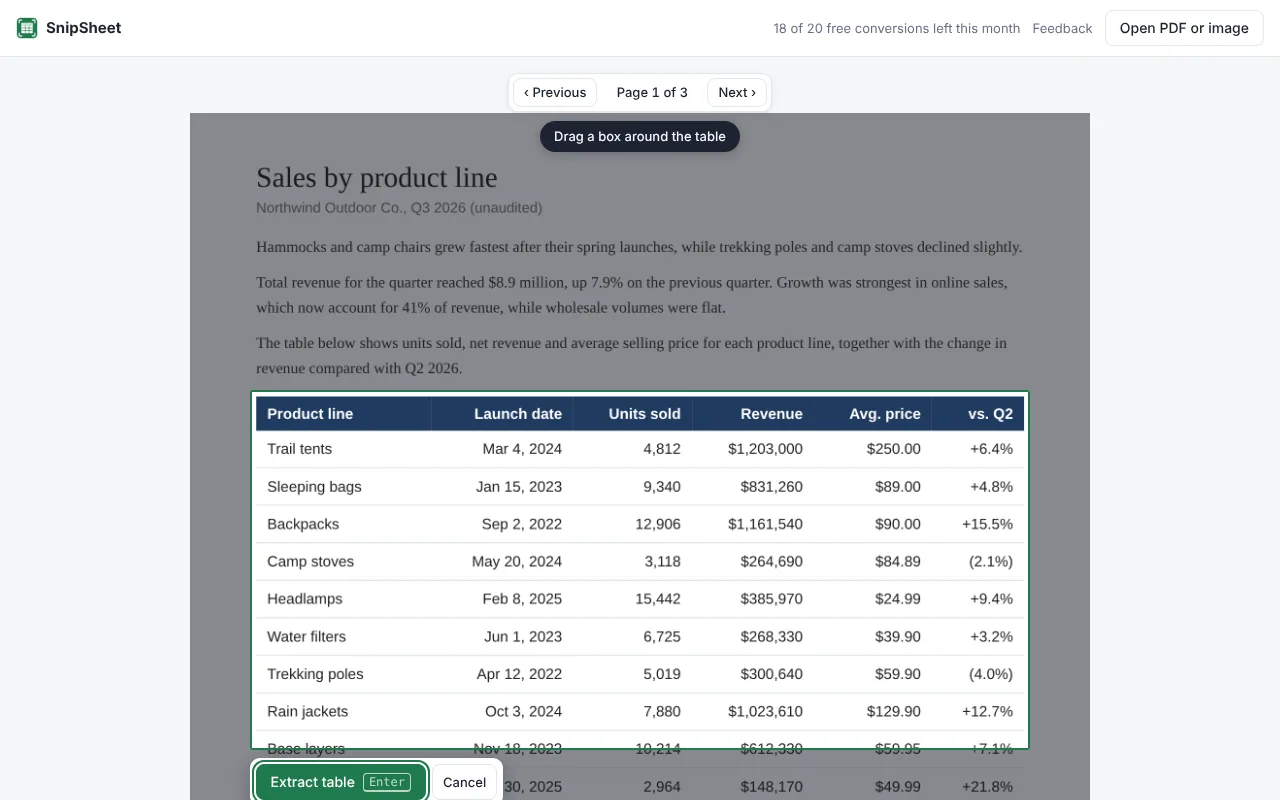
Numbers, percentages, currencies and dates come out as real values, so you can sum and sort right away. Cells that were hard to read are highlighted, and you can fix any cell before you download.
Tips for a clean result
- Include the header row in your selection, so the columns get names.
- Leave out footnotes and page numbers around the table.
- Long table? Select the first part, click Add more rows, then select the next part. Repeated headers are skipped.
- Check one total. Whatever tool you use, compare one column total with the PDF before you rely on the numbers.
Try SnipSheet free. 20 tables a month, no sign up. It comes with a sample table so you can see how it works in seconds.
Add to Chrome, it's freeQuestions
Why does my PDF table paste into one column in Excel?
Because a PDF stores text at positions on a page, not as rows and columns. Copying loses the structure, so Excel puts each line in one cell.
Can I convert a PDF table to Excel for free?
Yes. Excel for Windows has a free PDF import under Data > Get Data > From PDF, and SnipSheet has a free plan with 20 tables a month.