 SnipSheet
How to convert a table that spans several PDF pages to Excel
Long reports and statements split tables across pages, often repeating the header on each page. Converting page by page leaves you with headers in the middle of your data and rows to stitch together.
With SnipSheet, select the table on the first page, click Add more rows, go to the next page and select the rest. The parts are joined into one table and repeated headers are skipped.
The problem with page breaks
Most converters treat each page separately. You end up with several small tables, a header row repeated on every page, and sometimes a row cut in half at the page break.
Join the pages with SnipSheet
- Click the SnipSheet icon, then Open PDF or image, and choose the PDF.
- Go to the page where the table starts. Drag a box around it, including the header row, and click Extract table. You can drag to the bottom edge of the window to scroll while selecting.
- Click Add more rows, then Next to go to the next page.
- Select the next part and click Add rows to table.
- Repeat until you have the whole table, then click Download Excel.
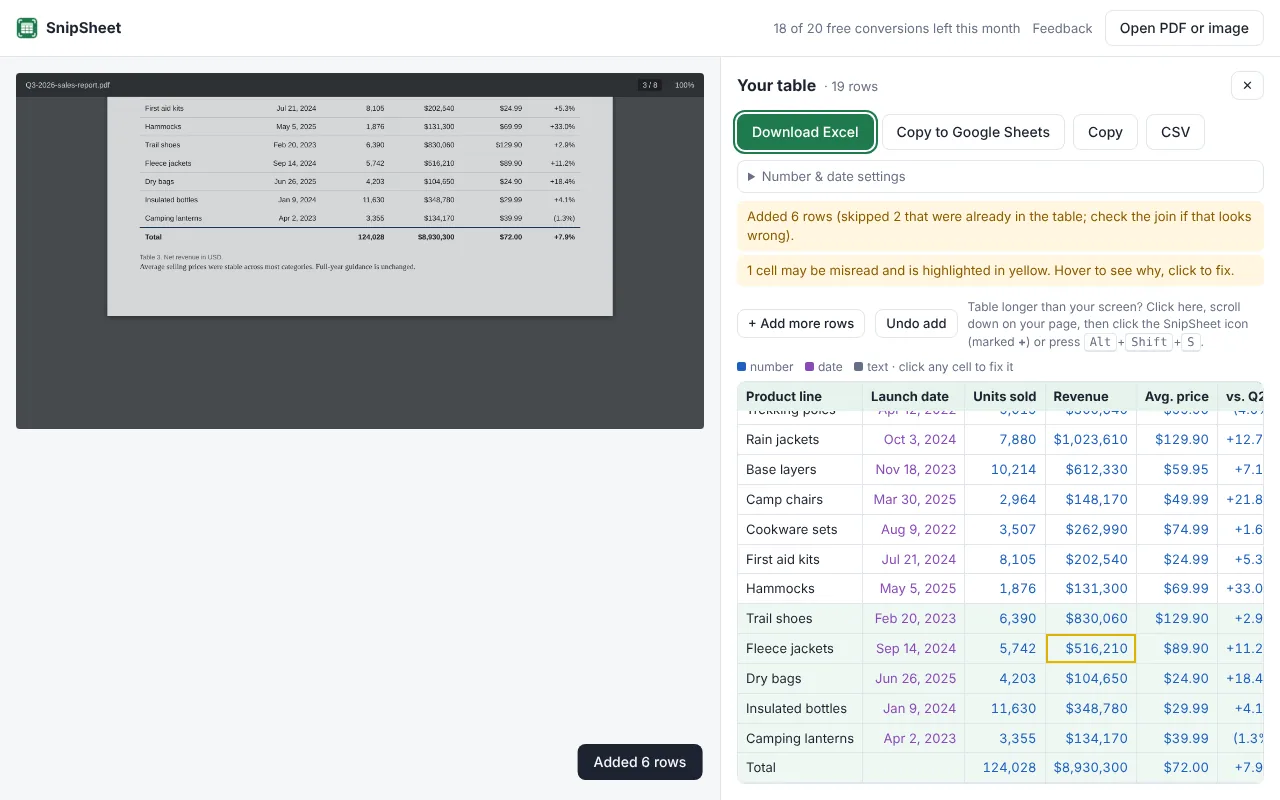
If you select a part by mistake, click Undo add to remove the rows you just added.
Tips
- Overlap is fine. If your selection includes the last row from the previous page, SnipSheet notices and skips it.
- Watch for subtotals at the bottom of each page. Leave them out of your selection if you only want the rows.
- Web pages work too: scroll down, click the SnipSheet icon again and add the next rows.
Try SnipSheet free. 20 tables a month, no sign up. It comes with a sample table so you can see how it works in seconds.
Add to Chrome, it's freeQuestions
How do I remove repeated headers after converting a PDF?
With SnipSheet you don't have to: when you add rows, a repeated header row is recognised and skipped automatically.
Is there a limit on how many pages I can combine?
No fixed limit. Each part you add counts as one table toward your monthly allowance.