 SnipSheet
How to get a table from a scanned PDF into Excel
If you can't select any text in your PDF, it is a scan: a picture of a page. Excel can't import it, and copying gives you nothing. You need something that can read the picture.
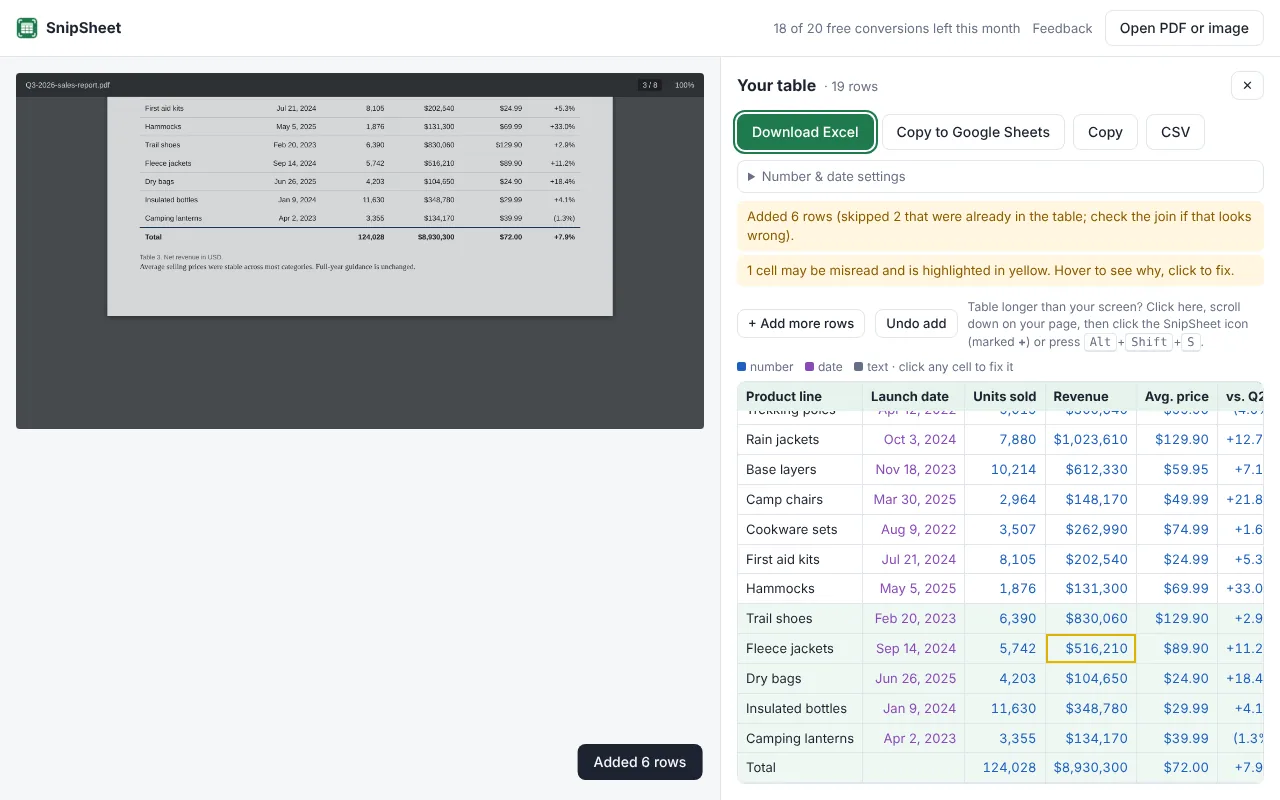
Use a tool that reads tables from images. With SnipSheet, open the scanned PDF, drag a box around the table and download it as Excel. Hard-to-read cells are highlighted so you can check them.
How to tell if your PDF is scanned
Try to select a word in the PDF. If you can't, or the whole page gets selected like a picture, the PDF is scanned. Faxes, photographed documents and old archives are usually scans.
Option 1: Excel's Data from Picture
Excel for Microsoft 365 has a Data from Picture feature that reads a photo or image of a table. You first need to save the PDF page as an image, and you get a review screen where you check the cells one by one. It works, but it is slow for anything more than a small table.
Option 2: SnipSheet
- Click the SnipSheet icon, then Open PDF or image, and choose the scanned PDF.
- Drag a box around the table. You can zoom with your browser for small print.
- Click Extract table. SnipSheet reads the scan and recognises numbers, dates and currencies.
- Cells that were hard to read are highlighted in yellow. Hover to see why, and click a cell to fix it.
- Click Download Excel.
Getting the best result from a scan
- Straight scans read best. If the page is tilted or blurry, rescan it if you can.
- Select only the table, not the whole page.
- Handwriting is much harder to read than print. Expect to check handwritten cells.
Try SnipSheet free. 20 tables a month, no sign up. It comes with a sample table so you can see how it works in seconds.
Add to Chrome, it's freeQuestions
Why can't I copy text from my PDF?
Because it is a scanned PDF: the page is stored as a picture, not as text. You need a tool that can read images, like SnipSheet or OCR software.
Does SnipSheet read handwriting?
It can read clear handwriting, but less reliably than print. Handwritten cells are often highlighted for you to check.